

Mastering Microsoft Excel: Your Comprehensive Guide to Building Effective Schedules
Microsoft Excel is a powerful tool capable of far more than just basic spreadsheets. Its versatility extends to creating a wide range of schedules, from simple daily planners to complex project management plans. This guide provides a detailed walkthrough on how to build a schedule in Excel, covering various applications and techniques. Whether you need to learn how to create a daily schedule in excel, manage a complex project schedule, or build a more specific schedule such as a loan amortization schedule, this comprehensive guide will provide you with the necessary steps and insights. We will explore different approaches, focusing on clarity and efficiency to help you effectively manage your time and resources using this powerful software.
Table
Creating Basic Schedules in Excel: Daily, Weekly, and Monthly Planners
Building a basic daily, weekly, or monthly schedule in Excel is a straightforward process. This section focuses on how to create a schedule in excel for personal or simple team use. The foundation lies in effectively using cells to represent time blocks and tasks. Understanding how to structure your worksheet is crucial for efficient schedule management.
Setting up Your Worksheet for Daily Scheduling
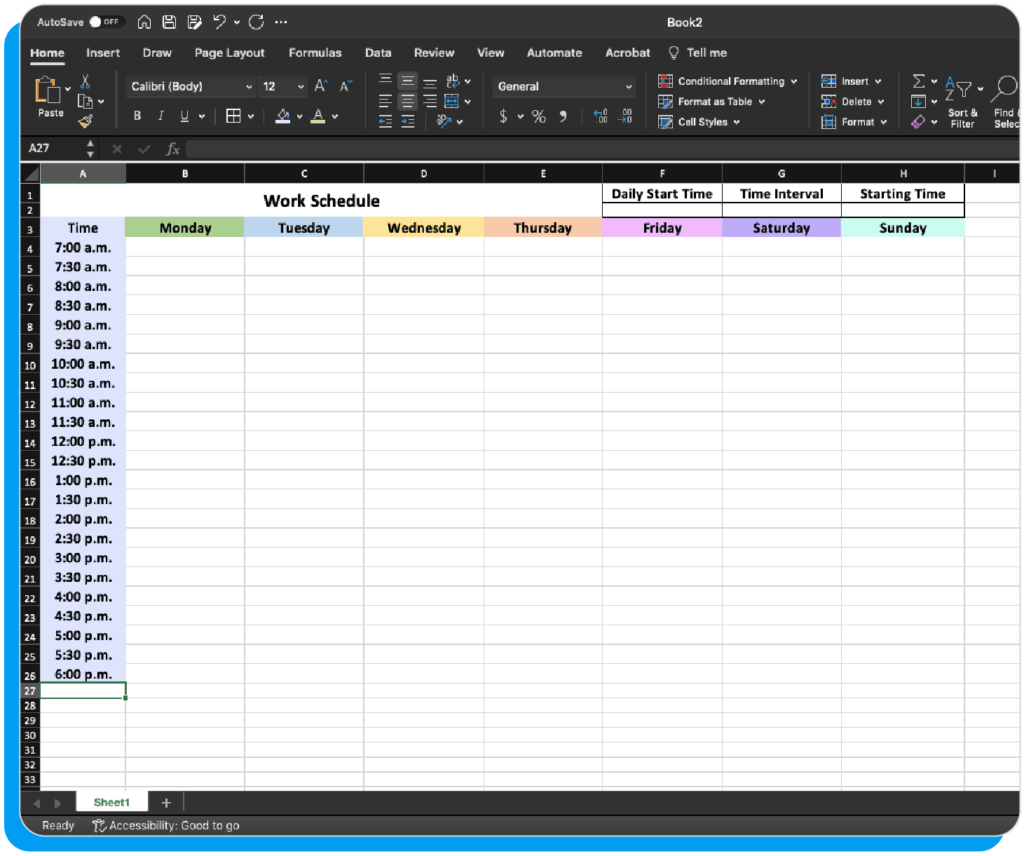
To create a daily planner in excel, start by creating columns for Time, Task, and Notes. You might choose 30-minute or hourly intervals for the Time column. The Task column lists your scheduled activities, while Notes allows for additional details. Using formatting, you can colour-code tasks or highlight important events. For example, you can learn how to create a daily schedule in excel by assigning specific colours to different categories of tasks, making it easy to visualize your day at a glance. This simple approach provides a visual representation of your daily activities and makes it easy to keep track of important appointments, meetings, and deadlines. How to create a daily schedule in excel is fundamental for any user aiming to achieve effective time management.
Structuring Your Weekly Schedule
Creating a weekly schedule in excel builds upon the daily format. Instead of a single day, you'll have multiple columns, one for each day of the week. This method is ideal for visualizing your workload across an entire week. This approach to how to create a weekly schedule in excel allows for a greater overview of your tasks and responsibilities. You can further enhance this weekly planner by integrating colour coding for task priorities or adding rows for recurring appointments. Learning how to create a weekly schedule on excel is beneficial for those seeking to improve their productivity and organize their workload more efficiently.
Managing Your Month with an Excel Monthly Schedule
Expanding to a monthly schedule offers a broader perspective. A single column might represent each day, or you can group days into weeks. This method helps you visualize long-term commitments and deadlines. You might include columns for project milestones or recurring tasks, providing a comprehensive overview of how to create a monthly schedule in excel. Adding conditional formatting highlights key deadlines, turning your monthly schedule into a powerful project management tool. Learning how to create a monthly schedule in excel ensures you are always informed about your monthly tasks and responsibilities.
Creating a Yearly Planner
For annual planning, consider using a yearly planner to visualise your year’s commitments and deadlines. This method helps you get an overview of your upcoming projects and tasks. You can use this to track progress and identify potential bottlenecks. This comprehensive overview will allow you to create a strong planning method and helps to successfully achieve your annual objectives. Learning how to create a yearly planner in excel will provide a robust planning methodology.
Advanced Scheduling in Excel: Project Management and Beyond
Excel's capabilities extend far beyond basic scheduling. This section delves into more complex techniques for managing projects and specific financial scenarios. It explores how to build a schedule in excel for intricate tasks and recurring events.
Project Scheduling and Management in Excel
For project management, you could adapt the weekly or monthly format. You can easily learn how to create a project schedule in excel by adding columns for tasks, deadlines, assignees, and status. Using Gantt charts (though requiring additional setup), you can visualize the project timeline and dependencies between tasks. Techniques like how to do a project plan in excel are useful for better management and tracking of project timelines. This visual representation will allow for efficient project management and resource allocation. This approach to how to do project schedule in excel ensures efficient project management.
Creating a Production Schedule in Excel
Production schedules involve scheduling resources like machinery and personnel. Excel makes this manageable through the creation of tables detailing production runs, deadlines, and necessary resources. This approach to how to create a production schedule in excel is very useful for production planning. You could use colour-coding to indicate different resources, making it easy to identify potential conflicts or bottlenecks in the production process. This will improve efficiency and minimize downtime. This is a useful technique when learning how to create a production schedule in excel.
Building a Staff Schedule in Excel
Creating a staff schedule in excel effectively involves using formulas to allocate staff to shifts and track their working hours. This helps in managing staff work hours and resources. This is useful for planning purposes and allows you to visualise staff deployment and avoid overbooking. A visual representation makes staff management more efficient. Learning how to create a staff schedule in excel is essential for efficient resource allocation.
Mastering Rotating and Round Robin Schedules
For scenarios requiring rotating schedules, like shift patterns or task assignments, Excel's formulas are invaluable. By using functions like MOD and WEEKDAY, you can automatically generate repeating patterns. This approach to how to create a rotating schedule in excel simplifies the assignment and planning of tasks and responsibilities. This allows for a fair distribution of work and provides a consistent schedule. Understanding how to create a rotation schedule in excel is crucial for scenarios demanding a fair distribution of tasks.
Financial Scheduling with Excel: Amortization and Depreciation
Excel's power extends to financial scheduling, allowing for precise calculations and visualizations. This section focuses on creating financial schedules such as amortization and depreciation schedules.
Creating Loan Amortization Schedules
Learning how to create a loan amortization schedule in excel is crucial for financial planning. This involves using financial functions like PMT (payment), IPMT (interest payment), and PPMT (principal payment). These functions calculate the monthly payments, interest portions, and principal portions of a loan over its lifespan. The result is a detailed table showing the loan's repayment schedule, including how much interest and principal are paid each period. Understanding how do you create an amortization schedule in excel will allow for proper financial planning and management.
Building an Amortization Table
An amortization table provides a visual representation of the repayment schedule for a loan. Each row represents a payment period, displaying the payment amount, interest, principal, and remaining balance. This visual layout simplifies the understanding of loan repayment. Learning how to create a loan amortization table in excel allows for efficient tracking of loan repayment. This makes it easier to track progress and understand the impact of interest and principal payments over time.
Creating a Mortgage Amortization Schedule
A mortgage amortization schedule is a specific type of loan amortization schedule tailored for mortgages. The principles are the same; you use the PMT, IPMT, and PPMT functions to calculate payments and track the loan's repayment. However, the length of the schedule and the potential for changes to interest rates make understanding how to create mortgage amortization schedule in excel incredibly important for responsible homeownership. This makes it easier to visualise mortgage payments and plan your finances accordingly.
Generating a Depreciation Schedule
For accounting purposes, businesses need to calculate depreciation. Excel helps create a depreciation schedule, listing the asset, its cost, useful life, and depreciation method (straight-line, declining balance, etc.). Using formulas, Excel automatically calculates the depreciation expense for each period. Learning how to create a depreciation schedule in excel ensures compliance with accounting standards. This enables accurate recording of asset values over time.
Creating schedules in Excel offers numerous advantages, improving productivity and providing clear, visual representations of your plans and financial obligations. Whether it's a simple daily planner or a complex financial model, mastering these techniques significantly enhances personal and professional organization.
This video might interest you: give it a watch
Recover Hidden Data: Mastering Excel Column Management Techniques

Mastering Checkboxes in Microsoft Excel: A Comprehensive Guide

Mastering the Art of Adding Signatures in Microsoft Excel: A Comprehensive Guide

Mastering Excel Links: A Comprehensive Guide to Linking and Managing Data

Mastering Page Breaks and Layout in Microsoft Excel: A Comprehensive Guide

Mastering Bullet Points in Microsoft Excel: A Comprehensive Guide
Leave a Reply
Contenido relacionado